I made this in about 5 minutes… sometimes having the right tool means pay a bit of money to speed up your workflow. Could I have done it for free? Yes. As accessibly? No.
Explain Everything Demo


The Blog of a Chronic Content Creator
I made this in about 5 minutes… sometimes having the right tool means pay a bit of money to speed up your workflow. Could I have done it for free? Yes. As accessibly? No.

It’s been awhile since I’ve talked productivity on this blog, but recently I’ve had a number of people point out to me that I’m extremely busy. If you don’t know, I have a few different roles professionally and personally – if you’re really curious, here’s the list as of today. But without boring you, know that I have multiple job titles and roles. I’m at the point this fall that I’m openly telling people that if they hear a story of me throwing someone out a window, it’s because that person told me “I’m too busy”, because I don’t know of anyone else on my campus that has as many irons in the fire, as it were, as myself. They probably exist, but haven’t revealed their true amount of overloadedness to me.
Anyway, this post isn’t about how busy I am – it’s about how I maintain a high level of productivity while being so busy. I figure every so often it’s a great idea to point out what I’m doing that makes me productive, so that I can share it with others. Also helps me highlight some of my older content that you may have missed. So here’s what I do:
So there you have it – in very basic terms how I stay productive. What I perhaps didn’t put here is that one also must balance things out within oneself to be productive – if you haven’t thought about it, I suggest two small additions to your life:
So there you have it, my tips and tricks, Fall 2021 edition. Stay safe, stay sane, and stay busy!

As goes the Jimmy Buffett song goes,
“Better days are in the cards I feel
I feel it in the changing winds
I feel it when I fly
So talk to me
Listen to this story
I’ve been around enough to know
That there’s more than meets the eye”
Seems appropriate for a school year that is starting out amidst uncertainty over what will be the norm, with a virus that won’t just go away, with people who are desperate for some bit of the familiar in still unfamiliar times.
The last 18 months have been really unique and challenging, but I think the best we can do is realize that all things do pass. Tomorrow might not be better than today, in fact, it might be worse – but every day offers the possibility of things getting better, and eventually the better days offset the worse. As we move into the 2021-22 school year, watch out for each other, be kind, and if I can help, reach out to me.

If you ask around the internet about rest days, you find a debate between the “be active every day” crowd and those who insist that your body needs recovery time. And honestly, the answer is somewhat in the middle. If you’re doing something that requires regeneration, such as strength training to build muscle, than yes, a rest day is critical to give your muscles time to heal. If you’re power walking, which is one of my main forms of workout (e.g., walking at a pace of a 13:30 mile, or about 5.5 MPH), you will find there are mornings your legs are on fire from last night’s walk. And if you walk outside, like I do, you also have the weather to contend with. Hard to go for a long walk or run when it’s pouring out (Although I have been the crazy guy out there in light rain with an umbrella walking!)

However you feel about rest days, one thing that’s very clear is that Apple doesn’t give you any days off if you’re a fan of the mantra “Close Your Rings”. Heck, it wasn’t even until last year that they gave us the option to change the amount of exercise minutes and stand hours (It was previously set to a hard 30 minutes and 12 hours, respectively). Plenty have complained that this is unrealistic – why should your 400+ day move streak end because of circumstances outside of your control. What circumstances, oh…
Plenty of reasons you might not be able to log your move calories, your exercise minutes, or your stand hours. Should you just let the streak die? No!
Well, perhaps Yes – you see this all gets into how you measure your own success. Unless you’re competing with another, the majority of the time you’re using your rings as a way to be honest with yourself. Closing them gives you a sense of accomplishment, earning badges gives you small boosts of dopamine that say “I’m doing stuff…”. And failing to close them can make you discouraged if it was due to circumstances not related to your fitness. I’ve certainly had friends joke “If you workout and your watch doesn’t record it, what was the point?!?” – And for some of us, psychologically, there is a grain of truth there. So should you let a streak die? Here’s my simple rule:
I’m assuming if you’ve made it this far, you fall into the “Save my Streak” category, so I’m going to use the rest of this post to tell you how to do that without having to install any special software. Turns out there is a way to preserve your streaks without much effort.
The Obligatory “Why I Figured This Out” portion of the Recipe
So I know you just want to know how to do it, so skip this unless you know me personally and are curious. Anyway, as of today, here are my streaks:

As you can see, I have been working out a lot over the past year. As I mentioned in Part 3 of my weight loss story, I really wanted to make it to 365 days. Which I did. Then I kept going. But at some point the streak that I set each day became further affirmation of my changing body and mind, and I really wanted to keep it. So much that I changed my move goal from 810 calories to 480, my workout goal from 30 minutes to 10, and my stand hours remained at 12. Now here’s the kicker – I’ve never needed to “use” these lower levels, on average – over the past 90 days, my average Move is 880 calories, and my average exercise minutes is at 72 minutes. With the exception of a few days of driving for summer trips, I don’t need to use the lower goals to maintain the streak.
This got me thinking: What if there were a way I could return to my actual goals, but still have the security of being able to persist in my streaks even if my watch dies (like it tried to do the other day), or in an emergency I can’t work out. And maybe, just maybe, it would be useful if I wanted to give myself a “day off”, but more on that later.
Then I realized – Apple lets you do this already, all you need to know is where to look.
How Do I Fill My Rings Manually?
It’s easy – follow these steps:
And there you have it – You should see the Apple Activity app on your watch update as well as on your phone. You’ve essentially done exactly what your phone would have done if you’d worked out, but you entered it in manually. Yes, the iPhone will flag this as “Entered by user”, but it will still count it.
When Should You Use This Power?
Again, this question is largely up to you. But one thing that I have thought a lot about lately is “rest days” – as in, days when either my Oura ring outright tells me to rest…

Or on special occasions – a holiday or a day I feel I’ve earned a break. I’ve considered having 10-15 days per year that I could “use” (Sort of the equivalent of workout “paid time off”) as I like. I haven’t decided yet on if I will do this, or how I would track it, but I’d love to hear your thoughts on it.
In fact, I’d love to hear your thoughts on all of this “nonsense” (Which I put in quotes because sometimes the realist in me calls my mind out and says “Dude, this stuff doesn’t really matter – health is for you, who cares if a stupid smart device confirms what you already know!”). Are streaks meaningful? Do you care about a sleeve of virtual medals? If so, why? If not, why not? And will you “cheat” or stay honest in your streaks?

One of my classes this semester requires me to track how often students speak in class, and evaluate each comment. I also have students leading discussion, and I need to be able to generate completed rubrics easily for them so they get my feedback.
I’ve found that I can keep track of all of this in an Excel Spreadsheet on my iPad Pro, and that I can also use Excel to generate individual rubrics and a class wide participation report.
Here’s an example workbook that you can download and modify, and some screenshots that explain how it works.


Hopefully you find the spreadsheet useful – I know I have in just the 2 weeks I’ve been using it. It’s saved me a lot of administrative work, enabling me to do more “fun” pedagogical stuff in class!

Last week I attended a workshop on Differential Education, and realized that I’m already doing something very “differential-ly” – starting this semester in my General Psychology class. Students do a five minute entry ticket each day upon coming into class, and a five minute exit ticket on the way out. Combined, these two tickets count for 50% of their overall course grade, and I grade them not only for participation, but also accuracy. Initially I began creating them using Socrative, however I found it to be a bit buggy for my tastes, and switched to Google Forms.
Here’s what I do each day:
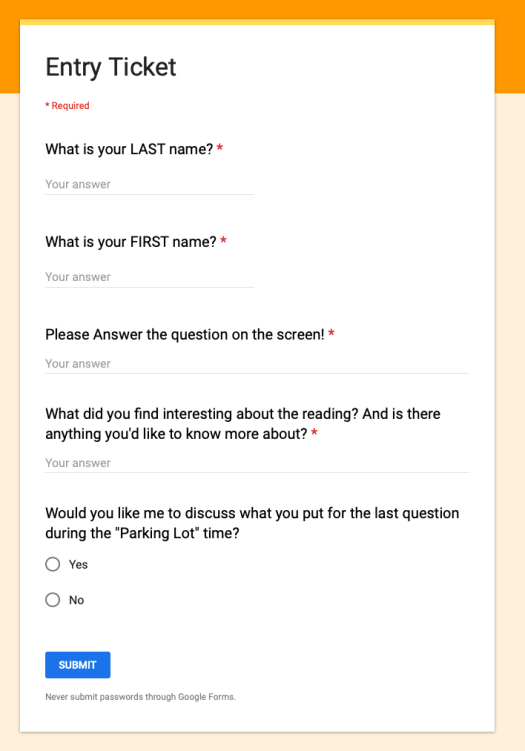

I’ve found this to work really well this semester. Students are (mostly) reading and engaged. And in the end, it was much easier to set up using Google Forms / Sheets than through Socrative or any other ‘education’ product.

One of the great things about being a professor is that we’re essentially trained to be project managers – people who are specialists in a given topic area but also trained through graduate school to be self-sufficient. It surprises many to learn that when I’m assigned a course to teach, I receive very few ‘mandated’ guidelines. Yes, periodically we have required sections in our syllabi on university policies, or perhaps my curriculum committee (of which I’m a member) requires certain courses to use the same book or have a common assignment. But otherwise, no one tells me what content I must teach, what assignments I must give, or how to evaluate my student’s work. The same is true in the realm of scholarship and service – I am expected to select my own projects, manage them to completion, and provide service to my institution and discipline. When it comes to my formal workday, I’m expected to be in the classroom to teach when assigned, to be available for 10 office hours a week, and to be available for meetings as needed. Beyond that, there is no 8-5 expectation on professors – we’re asked to fit our lives around specific class times, not a traditional workday (Which is also why, at my institution, we don’t get personal leave).
However this level of freedom can be challenging for some. Recently one of my colleagues posted on Twitter a request:
As someone who has worked from home a lot in my past (I lived 50 minutes away from my undergrad institution, 120 minutes away from my graduate institution, and a 2 hour commute away from my postdoc), I’ve picked up a few tips I’m happy to share.

It is extremely important to have everything you need in your home workspace. In 2010 I bought a 27” Apple Cinema Display for work, and while pricey ($999) I fell in love with it at work. So when I had enough money, I bought a second one for my home office. There is absolutely no way I’d be able to do as much work at home if I didn’t have a large monitor on par with what I have at my office. The portability of a laptop, in my case a 2015 MacBook Pro, is key for a mobile professional – but you need to have a good place to park it at home where you can enjoy larger full-sized screens and peripherals. Also included in the setup is a full keyboard with number pad (essential for entering data), and an external trackpad so I don’t have to reach forward to touch the one on my Mac. Finally I have a set of wireless headphones (Beats Solo 3’s) that I can use to block out the world if need be.
However physical setup is only one part of the essentials – you also need to be able work on anything you need, anywhere you are. To do this, I leverage cloud storage extensively (OneDrive is my preferred storage provider these days, I purchase a home version of Office 365, which provides MS Office + 1 TB of space), as well as iCloud storage. I also install TeamViewer (Free for personal use) on my computer on campus so that I can securely connect up to it remotely in case I do happen to leave a file there. I also never use USB drives if I can avoid them – it’s horrible to have just 1 version of a file, and even worse if you lose the USB drive that the file is stored on, or if the USB drive fails!
One thing I realized years ago was that I needed a To-Do list, and more importantly, I needed one that didn’t show me things I couldn’t do just yet. Having dozens of tasks ahead can be daunting, but it’s even worse when you see things that there is no way you can complete – perhaps you’re waiting on someone else, or they’ve told you “We’ll make a decision on that 3 months from now”. Leave the to-do on the list, and you feel like you’re not accomplishing anything. Take it off, and you never remember to put it back.
So years ago I started setting “start” dates on all of my tasks, so that I wouldn’t see them on my list until the first day I could do them. This helps me focus much more on what I need to do, versus what I will do down the line. It also means that I don’t fear putting a task on my list for the far future. I’ve actually had people remark to me “Wow, I can’t believe you remembered that” – it wasn’t memory, it was the item I put on my to-do list a year ago!
I didn’t have an office for the first half of my professional life. I lived completely out of a bag, setting up shop at coffee shops, fast food restaurants, libraries, and in my car. As a former Windows Mobile MVP, I learned a number of tricks for staying productive while away from a dedicated workspace. They include…
I’ve heard people say “I don’t have time to learn X” or “I don’t have time to work on Y”. To them, I say “You can’t afford NOT to learn X” or “work on Y”. XKCD comics has a good example of what I mean here – this one. Think of learning new skills as an investment – one that crosses over from work to personal life, office to home productivity.
Finally, when I’m working remotely, I realize I need a clear goal of what I need to do. When working at my office, this happens somewhat naturally – my mind natively thinks of things that I do at work. However when I’m out of my office, I need to remind myself (with the help of my to-do list) what needs to get done, when it needs to get done, and what today’s task builds on for the future. It helps me avoid distraction, because I know what needs to get done. I’m not wandering aimlessly at home thinking “Wouldn’t it be more fulfilling to watch TV right now” – I instead have the thought “It’s going to be great to get this done before I go to my office tomorrow morning”.
Working from home (or anywhere other than your office) is a freeing experience, and something that I definitely think is useful for an academic – part of our jobs is to be in tune with the world around us, lest we become antiquated. However it can be challenging, and ultimately everyone finds their own solution. Just keep plugging away at the problems you find in your own system until you have it up and running smoothly!
Recently a friend posted an article to Facebook about a colossally stupid thing two individuals did. The story wasn’t important, although it was interesting within it’s context. What I found really interesting was the first comment, which read “I bet they voted for Trump!”. Given our political climate in the United States over the past several years, it got me thinking: What causes people to become politically obsessed to the point that literally everything revolves around politics?
Each year I try to write something on my blog right before school starts up again. This past week has been pretty crazy as I juggle multiple roles while making sure everything is set for Monday when I step back into the classroom for the first time since the end of April. And tomorrow I get to take on a fun new role – the guy helping to drive the Peoplemover during Move-in Day. It’s been busy, but I still found some time to put together this post. This year I’ve decided to write it to the students who will eventually find it over the next few weeks – those intrepid individuals who think “Wonder what’s on my professor’s blog” or find a link to this on social media. So allow me to introduce myself, using photos!


So there is a quick photo summary of your crazy professor. I’ve been teaching for a long time, but I’m still learning every day. If you happen to read this, come up to me and tell me! Its not weird to “stalk” your professor (here or on social media) – we’re all human and we like to learn about other humans. That’s why I went into teaching and psychology in the first place! Have an awesome school year everyone!

As a psychologist, I often am asked questions related to children, child rearing, and development (Despite not being a developmental psychologist!). As a generalist in teaching psychology, I do my best to give researched and nuanced answers. One comment I often get from students and parents alike is that they disagree with most experts on spanking. They believe it’s an effective form of punishment and (in some cases) have told me that they will not change their mind. I figured today I’d take some time to explain the reasons why spanking is wrong, giving you a chance to think about them and debate.
Continue reading “Spanking is Wrong for These Three Reasons”
